
Knowledge Base
Season passes typically give a customer unlimited returns for one person until the expiration date. Passes are purchased as Add On items and are not linked to a specific showtime.
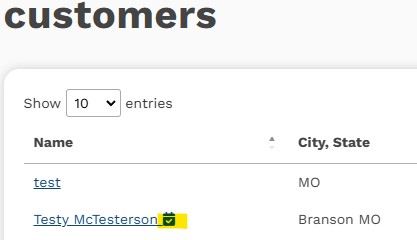
When a customer has purchased a season pass, the pass and its expiration date will be listed in the customer record. In the main Customers grid, you'll see an icon indicating that the customer has an active season pass:
Additionally, when you go to the user's detail page, you can confirm and edit the pass information:

Create the customer's reservation as normal. You will typically enter enter at the regular box office retail rate. Be sure to link the correct customer record (the one with the pass). When you get to checkout, you'll see a new option to charge the reservation to the season pass.
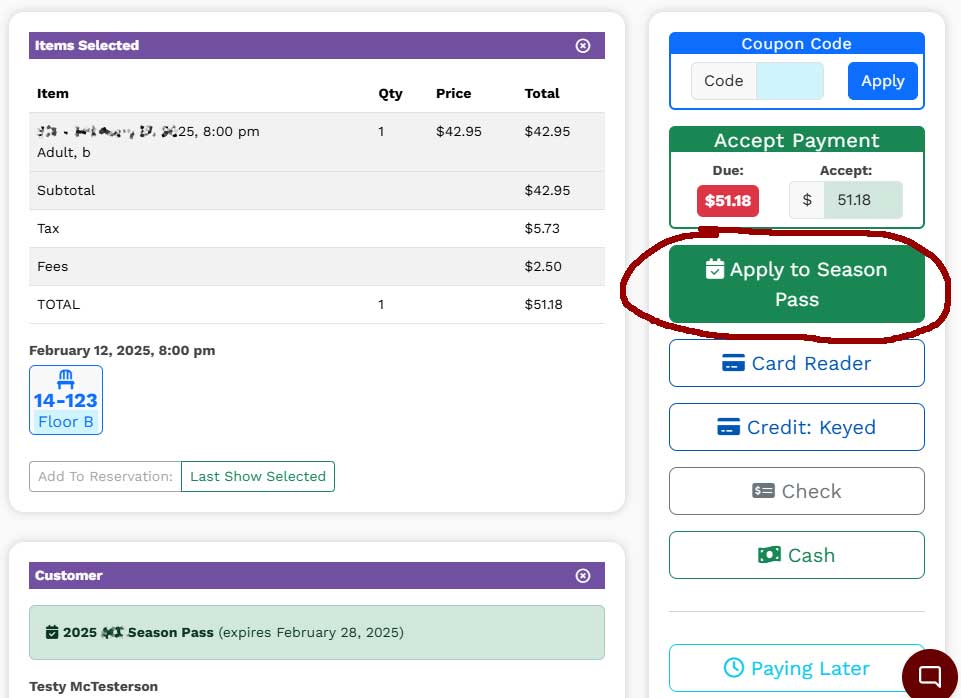
Select this option, and proceed as you normally would. The reservation will be completed, and no money will be due.
If the customer has pass and non-pass items on the same reservation, you can manually alter the amount that will be charged to the pass in the Accept Payment box and complete that portion of the charge first. You can then collect the balance due using any of the other payment methods.
To avoid having to do math at the point of sale for pass/non-pass reservations, it may be easier to create two reservations... one with the pass items and the other with the items that will be paid separately.